用 systemd.timer 实现萌萌服药提醒
有太多药要吃了!
Section titled “有太多药要吃了!”在往返几次武汉六角亭 + 多次通过非法渠道购物(嘘)后,Noa 目前日常要规律服用的东西 大概有以下几种:
HRT 相关
Section titled “HRT 相关”- 诺坤复(Estrofem),每日 3 次(7:00/15:00/23:00),共 6mg 舌下含服
- 色普龙(Androcur),隔日 1 次,每次 12.5mg
- 草酸艾司西酞普兰
(陆峥快乐片),每日 1 次,每次 15mg(1.5 片) - 劳拉西泮片,每日 2 次,每次 0.5mg(0.5 片)。
会哄我睡觉,不知道为什么被要求早上吃 - 米氮平片,这个被开了但是暂时没有吃,不想给肝太大负担
- 维生素 B,每日 3 次,每次 2 片。据说可以防止色普龙导致的抑郁但是感觉并没有什么用
- 维生素 C,随缘吃,保持一定程度的抵抗力
记不住要吃什么药了!
Section titled “记不住要吃什么药了!”在最开始只有吃诺和色,靠我这颗四足毛茸茸小型生物的大脑勉强还记得住什么时候吃(虽然色普龙隔天一吃这个事情也算给我带来了很大困扰嗯…)
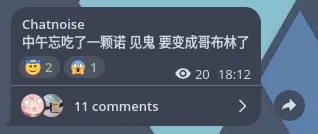
直到上周因为睡眠严重不安定跑去六角亭开了更多的精品神药,这下彻底没法靠脑子做服药管理了… 漏服的次数开始逐渐增加,尤其是草酸艾司和下午那顿诺坤复经常会忘掉,好几次差点被迫退化成雄性(
于是想要一个小工具提醒自己按时吃药。但看了一圈只有如下几个方案:
- 闹钟,这太吵了。而且完全没有仪式感
- 贴小纸条到显示器上。刚开始可能有用,到后面一定会被我无视
- 「提醒事项」或者类似的待办管理应用。似乎对这种很规律的事件不是特别友好?而且我平时很少看手机
- 专门的服药提醒 APP。好用的收费,免费的不好用
这时突然想到:Noa 基本一整天都对着电脑。那会不会有在电脑上发送持久提醒的办法呢?
Crontab
Section titled “Crontab”第一直觉是 Crontab 定时任务 +notify-send。
可 Crontab 只能在系统级别设置,而这台机器上的 其他人 显然不需要 Noa 同款服药提醒… 虽然可以指定用户身份运行,但不管怎样 Crontab 设置也势必落入 system 的 scope 而非 user scope,需要使用 NixOS Module 管理而不能使用 Home Module 了。不是很喜欢。
systemd.timer
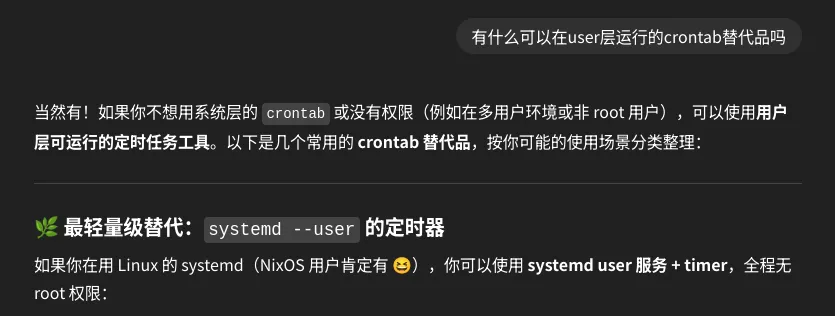
Section titled “systemd.timer”问了下 Lyra 有没有其他 user scope 的可选方案:
那么来写一点 Nix 吧
Section titled “那么来写一点 Nix 吧”作为一生都在追求 Pure 和 Reproducible 的 Nix 魔怔壬,手写 systemd unit 是不可能的!绝对不可能!
这里可以用到 home-manager 提供的两个 config:systemd.user.services 和 systemd.user.timers。它们的语法和 systemd unit 原生语法基本一致,并没有做太多的映射魔改,直接写 config 部分就好。
config = { systemd.user = { services = ?; timers = ?; };};这里有两个问号需要填,它们的内容应该是由 options 的最终取值派生出来的。options 里应该有足够的选项可以配置多个提醒定时,包括设置提醒时间、定时要触发的提醒内容(命令)。先写一个生成器占位在这里:
config = { systemd.user = { services = generateSystemdServices cfg; timers = generateSystemdTimers cfg; };};下面定义一下 reminder options。写成一个 submodule,这样可以在外层 option 定义里用 type = with types; attrsOf (submodule reminderOpts),把 reminder option 界面设计成一个 attrset。
reminderOpts = _: { options = { OnCalendar = mkOption { example = [ "*-*-* 4:00:00" ]; type = with types; listOf str; }; ExecStart = mkOption { example = '' notify-send "Hello world!" ''; type = types.str; }; };};对应的外层 option 就可以这样写:
options = { noa.reminders = mkOption { example = { "estrofem-intake" = { OnCalendar = [ "*-*-* 15:00:00" ]; ExecStart = '' notify-send -u critical -i /home/cmiki/Pictures/estrofem.png "HRT Reminder" "Time for an estrofem intake" ''; }; }; type = with types; attrsOf (submodule reminderOpts); };};最后就是编写两个生成器的实现了,对于 systemd 的语法来说难度不大,但是要注意利用好 lib.attrset 里的辅助函数,避免走弯路造轮子。
generateSystemdServices = reminderAttrs: lib.mapAttrs' ( name: value: lib.nameValuePair "reminder-${name}" { Unit = { Description = "Reminder service for ${name}"; }; Service = { Type = "oneshot"; inherit (value) ExecStart; }; } ) reminderAttrs;generateSystemdTimers = reminderAttrs: lib.mapAttrs' ( name: value: lib.nameValuePair "reminder-${name}" { Unit = { Description = "Reminder timer for ${name}"; }; Install = { WantedBy = [ "timers.target" ]; }; Timer = { inherit (value) OnCalendar; }; } ) reminderAttrs;这里要注意 service 和 unit 应当是同名的,这样它们会自动关联上,不需要额外在 timer 中指定 Unit。
导入模块和应用配置
Section titled “导入模块和应用配置”想使用 notify-send 发送可爱的持久通知!
因为 Noa 用的是 Mako 的默认配置,通知不会超时消失,只要我没点掉它就会一直在屏幕右上角挂着。
在 home-manager 配置里这样写:
let  # 来自 「精神污染」 贴纸包  getReminderIcon = filename: "${assetsPath}/reminder-icons/${filename}";  notify-send = lib.getExe' pkgs.libnotify "notify-send";in{  imports = [ ./options.nix ];
  noa.reminders = {    "estrofem-intake" = {      OnCalendar = [        "*-*-* 07:00:00"        "*-*-* 15:00:00"        "*-*-* 23:00:00"      ];      ExecStart = ''        ${notify-send} -u critical -i ${getReminderIcon "estrofem.png"} "HRT Reminder" "Time for an estrofem intake"      '';    };  }}
这样一个萌萌的桌面定时通知提醒就做好啦。效果如下:
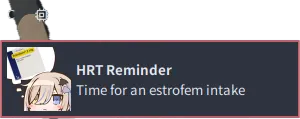
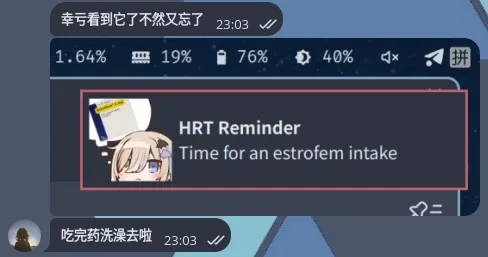
提醒效果还蛮不错的,目前是开始使用它的第二天,已经救了我两次(
模块源代码可以参考这里:https://github.com/AsterisMono/flake/tree/main/homeModules/apps/reminder